
Download Network Administrator – network management, Windows, remote control, batch operations, time synchronization, service management, device control
Overview
Network Administrator is a utility application designed for IT professionals and network administrators managing multiple Windows-based systems within a local network environment. The software aims to streamline administrative workflows by enabling centralized control over essential network functions. Its primary purpose is to reduce the manual effort required to configure and maintain multiple machines, especially in small to medium-sized enterprise settings. By offering tools for batch operations, time synchronization, and remote device management, the application helps maintain consistency, improve system reliability, and enhance security across networked devices.
Target users include system administrators, IT support staff, and network engineers responsible for managing shared infrastructure. The app addresses common challenges such as inconsistent system clocks, misconfigured services, and uncontrolled peripheral access—issues that can lead to operational inefficiencies or security vulnerabilities. Real-world use cases include standardizing time settings across workstations before scheduled backups, restarting critical services after updates, or disabling USB ports during sensitive operations to prevent data leakage.
Although the developer did not provide additional background information, the app’s focused feature set suggests a specialized tool built for practical, on-the-ground administrative needs. Its presence in the utilities category reflects its role as a niche but valuable asset in the broader IT ecosystem. Despite its release date in 2012, the application remains relevant for organizations still relying on legacy Windows environments where lightweight, dedicated tools are preferred over complex enterprise management platforms.
Key Features & Functionality
- Batch Operations: Perform identical administrative actions—such as software deployment, configuration changes, or file synchronization—across multiple machines simultaneously. This reduces repetitive tasks and ensures uniformity across the network, saving time during large-scale updates.
- Time Synchronization: Align the system clocks of all connected devices with a single command. This is essential for accurate logging, audit trails, and coordination between time-sensitive applications like scheduling tools or backup systems.
- Service Management: Start, stop, or restart system services on remote machines from a single interface. This allows administrators to quickly address service failures or optimize performance without physical access to each device.
- Remote Device Control: Disable or restrict external device connections such as USB drives and optical disc readers. This feature supports compliance with data protection policies and helps prevent unauthorized data transfer or malware introduction.
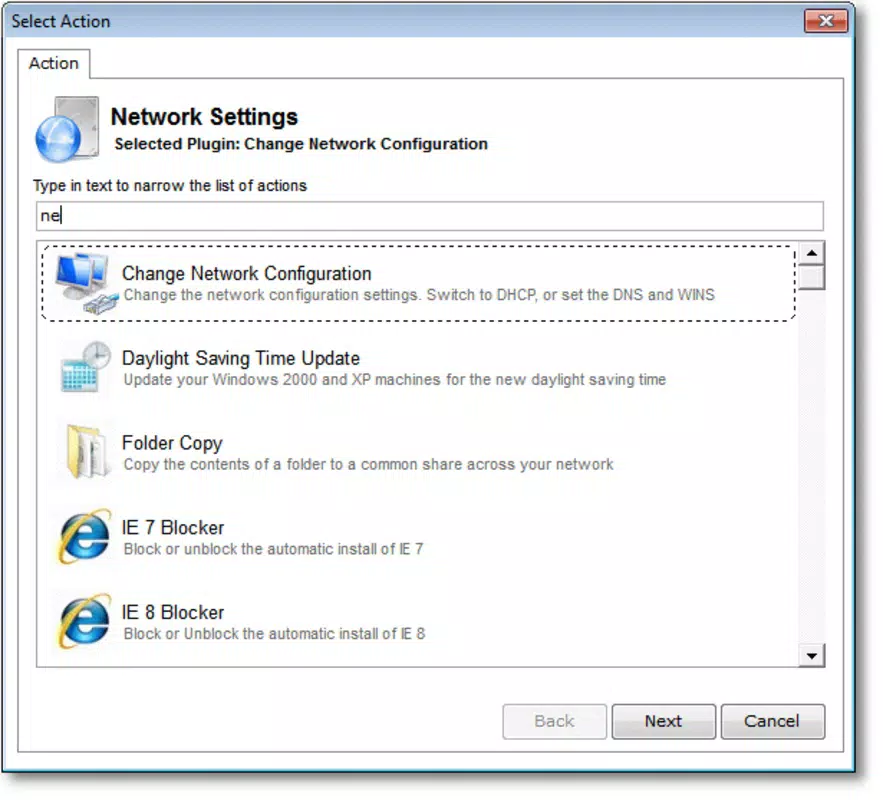
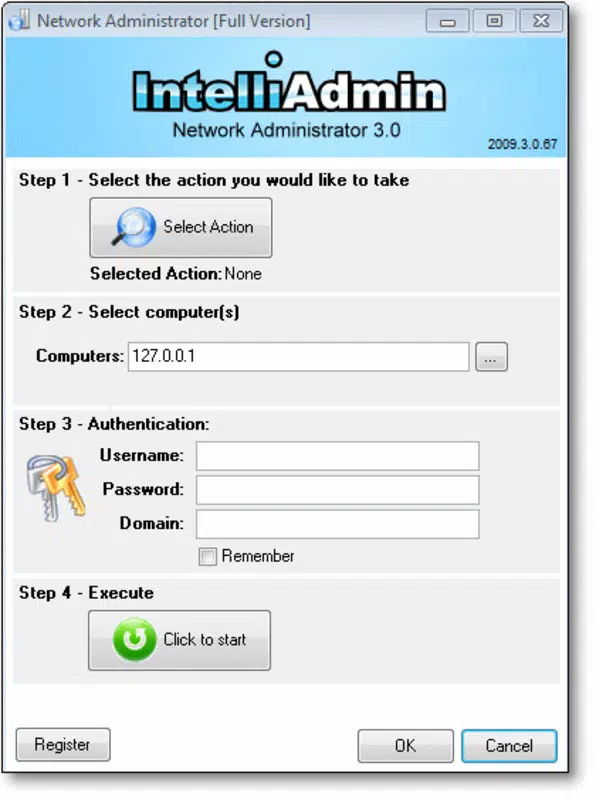
- User-Friendly Interface: The compact layout provides quick access to core functions without overwhelming users with unnecessary complexity. The intuitive design supports rapid adoption, even for administrators with limited experience in remote management tools.
For example, during a security audit, an administrator could use the device control feature to disable USB ports across 20 workstations in under a minute. Similarly, after a system update, batch service restarts can be initiated to restore functionality across the network efficiently.
Interface, UX & Performance
The application features a minimalistic, task-oriented interface that prioritizes functionality over visual embellishment. Navigation is straightforward, with clearly labeled buttons and a hierarchical layout that guides users through common workflows. The compact design ensures that essential controls remain visible without requiring excessive scrolling or window resizing.
Although the developer did not list formal performance metrics, the app’s lightweight footprint of 4.5 MB suggests optimized resource usage. It is expected to run smoothly on standard Windows systems, including older hardware still in use within some enterprise environments. Responsiveness appears to be consistent, with actions such as service restarts or device disabling executing promptly after command submission.
Stability is likely maintained through focused functionality—by concentrating on a limited set of high-impact tasks, the application avoids the complexity that often leads to crashes or freezes. However, compatibility with modern Windows versions beyond the original release window has not been confirmed. Users should verify operational behavior on their specific system configuration.
Platform Compatibility & Technical Requirements
Network Administrator is designed for the Windows operating system. The application is compatible with Windows platforms, though specific version requirements were not listed by the developer. The software has a file size of 4.5 MB, indicating a lightweight installation that does not require significant disk space or memory resources.
Given the release date of June 15, 2012, the app was originally built for older Windows versions such as Windows 7 or earlier. While it may still function on newer systems, the developer did not specify minimum OS requirements or compatibility with Windows 10 or Windows 11. Users should exercise caution when deploying on updated systems, as legacy applications may encounter runtime errors or fail to access system-level functions due to enhanced security restrictions.
Pros and Cons
Pros
- Efficient batch processing reduces administrative workload across multiple machines.
- Time synchronization ensures consistency in logs and scheduled tasks.
- Remote device control enhances data security and compliance.
- Compact interface enables quick access to essential tools.
- Lightweight size (4.5 MB) allows easy deployment on low-resource systems.
Cons
- Compatibility with modern Windows versions is not confirmed.
- No information on update frequency or long-term support.
- Developer background and contact details were not disclosed.
- Platform availability is limited to Windows only.
- Does not support cloud-based or cross-platform management.
FAQ
Is Network Administrator available for macOS or Linux?
The application is designed exclusively for Windows. No versions for macOS or Linux were provided by the developer.
Can I use Network Administrator on Windows 10 or Windows 11?
While the app may function on newer Windows systems, the developer did not confirm compatibility with Windows 10 or Windows 11. Users should test the software in their environment before full deployment.
Is the app secure to use on a corporate network?
The application enables remote system control, which requires appropriate user permissions. Security depends on proper access management and network policies. No third-party vulnerabilities were reported in the provided data.
How often is Network Administrator updated?
The developer did not specify an update schedule. The last known release was in 2012, and no recent updates have been documented.
Can I install Network Administrator without admin rights?
Given its system-level functions such as service management and device control, the app likely requires elevated privileges. Specific installation requirements were not listed.
Final Thoughts
Network Administrator delivers a focused, no-frills solution for network administrators managing multiple Windows devices. Its core features—batch operations, time synchronization, service control, and remote device management—address real-world pain points in system administration. While the app’s age is evident, its lightweight design and practical functionality make it a viable option for organizations still operating on legacy Windows environments.
For IT professionals seeking a straightforward tool to simplify repetitive tasks and improve network consistency, this application offers tangible value. It’s particularly beneficial in settings where enterprise-grade management platforms are not feasible due to cost, complexity, or infrastructure limitations.
Download Network Administrator now


